Banner Size: Size Choices for Advertising Banners
Everything you need to prepare a banner or text ad for Apparel Search: sizes, file checklist, design tips and a size previewer.
A web banner or banner ad is a form of advertising on the internet delivered by an ad server or some other means. Apparel Search allows members of the fashion industry to use either text or banners to sponsor pages on our website as a method to draw visitors' attention. This page explains the sizes, file requirements and steps for getting your banner ready.
How Banner Advertising Works
This form of online advertising simply entails embedding an advertisement into a web page. To do this, your company would need to provide an image file and the location (URL address) that the banner would link to on your website. It would need to fit into certain size requirements.
The advertising banner is intended to attract traffic to a website by linking to the website of the advertiser. Web banners function the same way as traditional advertisements: notifying consumers of the product or service and presenting reasons why the consumer should choose the product in question.
The Apparel Search fashion guide allows for advertisements to be placed on certain pages of our website. The style, shape, content and size of the advertisements are reviewed on a case by case basis prior to launching the ad campaign. See advertising pricing for sponsorship levels and costs.
Common Banner Sizes
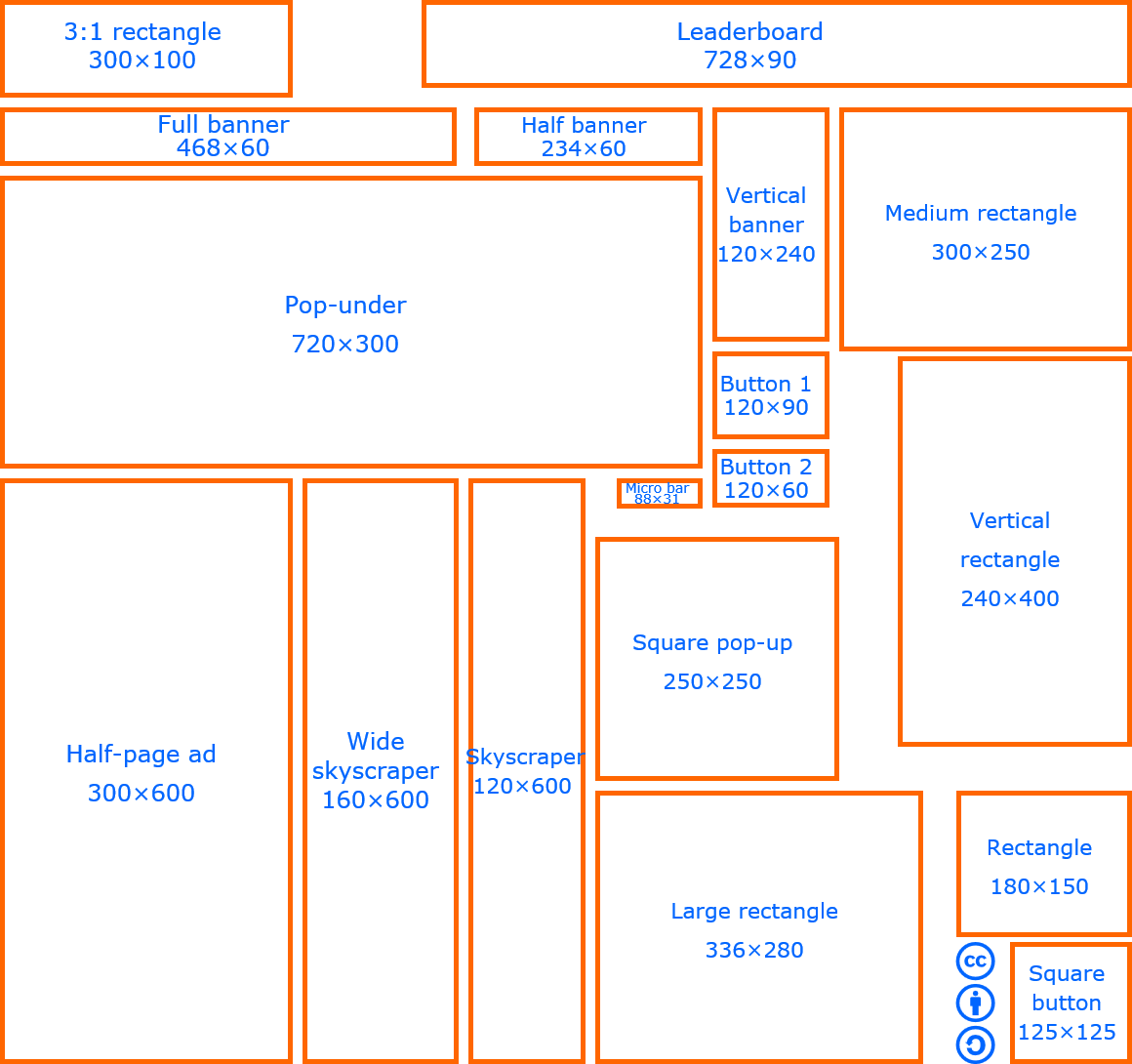
Shapes are shown to scale relative to each other.
These are common web banner sizes shown as examples. We do not guarantee we will use all of the sizes or styles illustrated; it depends on the layout of the individual page being discussed for advertising. All sizes need to be discussed and reviewed case by case.
Size Examples Image
Other Shapes, Sizes & Text Ads
You can also use other shapes and sizes. In addition, you are welcome to use TEXT messages. We are fairly flexible. Make a suggestion and we will try to accommodate you.
Try the Banner Size Previewer
Pick a size to see its shape, or check the pixel dimensions of your banner image.
Banner Checklist: What to Send Us
- Banner imageA web image file in the size you agreed on. JPG, PNG and GIF are the most common formats. Keep the file small so pages load quickly.
- Destination linkThe full web address (URL) your banner should link to.
- Alt textA short description of the banner for accessibility, such as your brand and offer.
- Placement & datesThe sponsorship level and when you would like to start. See pricing.
Design Tips for Fashion Banners
One clear message
Focus on a single idea, such as a collection, sale or service, so visitors understand it in a second.
Strong imagery
Use a sharp, high-quality image that shows your product or brand style.
Readable text
Use high contrast and keep words short. Make sure text is legible when the banner is small.
Clear call to action
Tell visitors what to do, such as "Shop now" or "Request a quote," and send them to a relevant landing page.
Since many visitors use phones, check that your design still reads well at smaller sizes, such as 320 × 50 or 300 × 250.
Link Back to Apparel Search
If you would like to be kind and create a link back to Apparel Search, you are welcome to do so. You can link to our site from text links or you can use one of our Apparel Search logos.
Text link
<a href="https://www.apparelsearch.com/">Apparel Search</a>
Logo link
<a href="https://www.apparelsearch.com/"><img src="https://www.apparelsearch.com/images/apparel%20search%20logos/apparel_search_logo_small_w.gif" alt="Apparel Search Fashion Industry Directory"></a>

Frequently Asked Questions
What size should my banner be?
Common sizes include 300 × 250, 728 × 90, 160 × 600 and 320 × 50, but sizes are reviewed case by case based on the layout of each page. Contact us with your suggestion.
Can I use a text ad instead of a banner?
Yes. Apparel Search allows text messages as well as banners, and we are fairly flexible about shapes and sizes.
Does Apparel Search use pop-up or pop-under ads?
No. We do not currently use pop-under or pop-up advertising.
What do I need to provide for a banner ad?
An image file in the agreed size and the web address the banner should link to. Alt text and your preferred start date are also helpful.
How much does advertising cost?
See the advertising pricing page for basic, category and main page sponsorship levels.