Languages / Translation
Translating Apparel Search
Fashion industry translations: Apparel Search works best when it is in a language you can actually read. Here is how to translate the site.
01 — Translate the Entire Site
How to Translate Apparel Search
In November 2019, Apparel Search removed the site's automatic translation system. If you would like to view the Apparel Search website in other languages, follow these steps:
Open Google Translate
Open a web browser and go to https://translate.google.com/.
Enter the site address
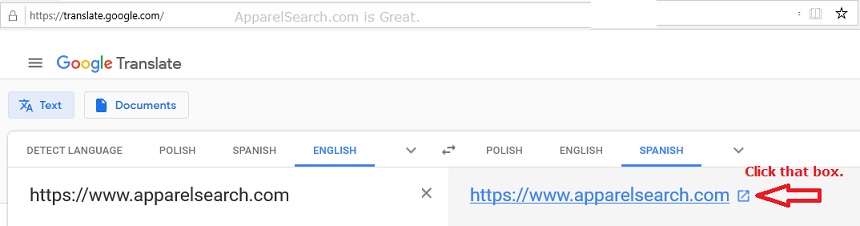
In the text box on the left, type or cut and paste the following address: https://www.apparelsearch.com.
Select your language
Select the language that you want the website to use.
Click Translate
Click Translate. Note: as of November 2019, Google does not make it very easy to see how to click translate; the location may have moved by the time you read this, but the screenshot on this page is marked with a red arrow showing the box to click to start the translation at the Google site.
02 — Find Translators
Translator Resources
- Bing Translators (Microsoft Search Engine): https://www.bing.com/translator/
- Microsoft Translator: breaking the language barrier at home, at work, anywhere you need it.
- Google Translator: https://translate.google.com/
- Translate the Web: www.translatetheweb.com
See also the international fashion industry and the countries pages, and a worked example of fashion translation: the plastic bag suffocation warning in English and French.
Common Questions
Common Questions
How do I read Apparel Search in another language?
Go to translate.google.com, paste https://www.apparelsearch.com into the text box, select your language, and click Translate. The site's own automatic translation system was removed in November 2019.
Which translator services does this page list?
Google Translate, Bing Translator, Microsoft Translator and Translate the Web.
Photos
Photos
Search Apparel Search